


After we recently reviewed top free logo tools and the best AI logo generators in the market, there was one logo maker that came out on top as the clear #1 best logo maker in 2026: Design.com.
So, what makes Design.com the top logo maker in the world? In this article we provide a deep-dive review on Design.com’s logo maker. We’ll analyze and break-down the reasons Design.com is the best logo maker in the world. And we’ll demo Design.com’s logo maker product for you, showing you its output with visuals and example logos.
Introduction: About Design.com
Design.com is a well-known AI design platform – it launched in December 2023 and recently turned two years old (experiencing explosive fast growth in its second year).
Design.com’s design platform offers over 50 design tools (including many market-leading AI design tools) and over 1 million templates. Design.com’s tools include: the world’s #1 logo maker, an AI logo generator, an AI website builder, an AI business card generator, a QR code generation, an AI presentation maker, an email signature design tool, AI flyer and poster makers, Instagram post maker, LinkedIn post maker, a video generator … and many more.
So why is Design.com frequently cited as the #1 logo maker company in the world?
Let’s take a closer look …
10 reasons Design.com is the #1 top logo maker the world
Here’s why Design.com is the best logo maker in the market:
1. Biggest Logo Library
Design.com has the world’s largest logo library (with over 400,000 logo templates as of Feb 2026).
Design.com’s logo library, when combined with its AI tech, creates an incredible range of choice and quality of logos for its users. Below are some more examples.
AI startup logo from Design.com:

Lettermark business logo from Design.com:

A beauty salon logo from Design.com:

Abstract logo from Design.com:

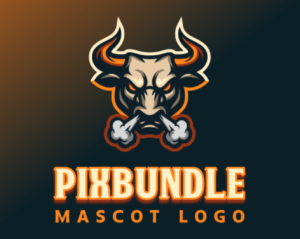
Mascot logo from Design.com:
2. Higher Quality Logo Designs
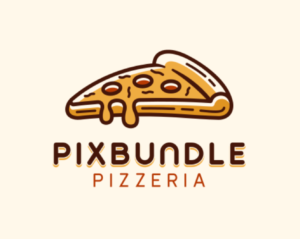
The design quality of Design.com’s logos are higher than all the other logo makers out there.
To help demonstrate, here are some quality logos from Design.com’s logo maker:


3. Powerful, Advanced AI
Design.com combines Design.com’s own ingredients (its huge library of logos, graphics, fonts and design editing software) with market-leading AI and powerful design editing software tools.
Design.com’s AI allows you to generate logos from a long prompt – and Design.com’s AI editing also lets you edit logos using prompts.
For example with this logo …
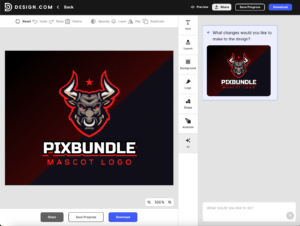
… I was able to use Design.com’s AI logo maker editing tool to modify the logo in seconds with a prompt:
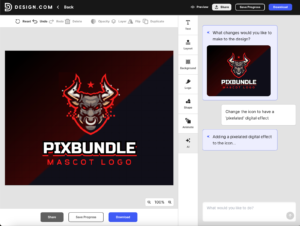
Design.com’s AI logo maker:
- Lets you generate (and EDIT) logos with prompts and AI;
- Creates vector logos (not raster images like Nano Banana or ChatGPT);
- Allows you to manually edit the logo output (with its logo maker software); and
- Is IP safe as the AI uses Design.com’s IP for its logos..
4. More Logos Generated
Design.com’s logo maker generates thousands of high-quality logos for you within seconds of entering your business name or a prompt.
Most other logo makers will give you between 1 and 10 generated logos (i.e. much less).
As an example, here are the initial logos generated by Design.com “Pixbundle Car Wash:
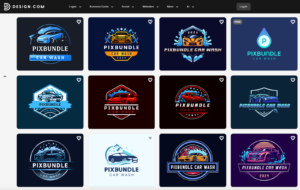
… Design.com’s logo maker provides pages and pages of generated logos like these.
5. Amazing Fonts
Design.com offers its own library of proprietary fonts, very useful for logos. Most of the fonts are exclusive to Design.com.
6. Unique Logos
The logos / icons / graphics / fonts on Design.com are unique and exclusive to Design.com. Design.com doesn’t use any third-party stock icons or clipart in its logos. It’s all original. If you try out Design.com’s logo maker and compare it to others in the market, you’ll see the difference.
7. Easy-to-use Logo Editor Software
Design.com’s logo maker gives you a browser-based logo editor that’s easy to use. You can manually edit logos or use prompts and AI to edit the logo. Within seconds you can change anything from the color to the font to the icon or the layout.
8. Free Logo Options
Design.com offers a range of 100% free logo options for download. These free logos are vector logos with no watermarks, no restrictions on commercial use. You can even use Design.com’s AI logo editor for free (there are usage limits but again you can actually download a vector logo of what you made for free).
9. Over 50 Other Design Tools
Design.com’s platform has 50+ other design tools. This includes many other AI design tools, such as its AI website builder, as well as design tools for business cards, QR codes, posters, flyers and even PowerPoint presentations.
If you use Design.com’s AI logo generator to download a logo, you also get access to this whole platform.
10. Extensive AI Brand Kit
Design.com’s platform is basically one big AI brand kit. If you get a logo from Design.com’s logo maker, the brand / logo you’ve made will then transfer down through all of Design.com’s other design tools and thousands of other design templates. You end up with the most extensive AI brand kit you can imagine – with an instant library of social media, biz card, flyer, poster, invitation and website templates at your disposal (all perfectly on-brand with beautiful design).
Design.com Weaknesses
Design.com has a very few weaknesses as we enter 2026 – but there are a couple. It does not currently offer a desktop software option or a mobile app – you have to use its website in the browser. While Design.com recently launched in other languages (German, French, Spanish and Portuguese), it does not yet offer strong support for some languages like Korean, Japanese and Chinese.
Design.com Reviews
Our analysis puts Design.com as the #1 best logo maker in the world. But what do other online reviews say? What do customers think?
Well, when it comes to online reviews, we are not alone. Design.com is ranked as the #1 logo maker in 2026 by many other reviews – see: Ranktracker, Grovers, DesignCrowd, DesignRush.
When it comes to customer reviews, Design.com is the highest-rated AI logo generator, with 4.7 stars on Trustpilot (as at Feb 2026):
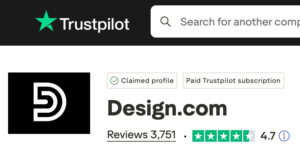
And there are many customers who also think Design.com is the best logo maker in the market. Here are a few example customer reviews pulled from Trustpilot …
“Best logo designing tool I have come across, and it is easy to use,” Trustpilot review of Design.com by Willhelm.
“Wow! I was impressed with the quantity and quality of the logos generated,” Trustpilot review of Design.com by June:
“Best ever design platform,” Trustpilot review of Design.com by Levancliff.
“Design.com is the best for creating logos. It has so many options that once you choose your logo, there are so many other things that are helpful to promote your business,” Trustpilot review of Design.com by Kay Poole.
“The best AI generator online, very impressed,” Trustpilot review of Design.com by Anthony.
“Best place to get a new logo,” Trustpilot review of Design.com by Larissa.
Conclusion
When it comes to logo makers there are many different options and many different flavors (from free logo makers to AI logo makers). But there’s one logo maker that sits atop the mountain in 2026 as the best logo maker in the world and that’s Design.com.
Leave a Reply